Network engineer learning Physical AI in public.

I'm a 14-year Cisco DevRel and AI consulting founder (Sierra Code Co) currently going deep on NVIDIA's OpenUSD and Physical AI stack. This is the journal: friction logs, cross-domain analogies between network automation and 3D scene data, and small demos I'm shipping while I learn.

The sprint

May 31 Jun 6 8 entries in 7 days

drag to look around
The 3D scan behind my latest entry: my own home office, captured with an iPhone and opened up so you can look inside. Drag to explore it, then pick any point on the timeline above to read the work.

Hover a point to preview click to read the entry here.

Scaniverse to Blender from a Royal Caribbean cruise ship

Open full page

Written from a Royal Caribbean cruise ship on satellite WiFi during the first session of the OpenUSD and Physical AI ramp.

The setup

I’ve spent 14 years doing network automation at Cisco, currently as a Senior Technical Advocate inside DevRel, with a side practice at Sierra Code Co doing AI consulting. I’m pivoting toward AI DevRel, and the specific role that matters this month is at NVIDIA on the Physical AI side of the GSI Developer Relations team. I have an intro call coming up with someone on that team, who’s deep on OpenUSD and the Omniverse Physical AI stack. I needed something more concrete than “I’ve been watching the talks” to bring to the conversation. The plan: do the entire real-to-sim pipeline end to end in one session, capture every friction note, and turn the friction notes themselves into the DevRel artifact.

The cruise ship is incidental but it ended up being the right constraint. Royal Caribbean satellite WiFi is metered, slow, and unreliable. Cloud GPU rentals were off the table from the start. Whatever I built had to work on a MacBook in airplane mode, exactly the constraint NVIDIA’s pure-Python OpenUSD authoring stack is designed for, even though the marketing assumes you’re sitting next to an RTX workstation.

The pipeline at the highest level

iPhone LiDAR scan (Scaniverse, Classic + Mesh mode)
  → USDZ export (~19 MB)
  → Blender 5.1.2 (USD import, Material Preview shading, viewport render)
  → PNG screenshot

That’s the loop. Every step is a single tool, mostly local, mostly free. No cloud GPU rental. The next iteration adds composed USD references on top, which is where the “non-destructive pipeline” framing starts to mean something concrete instead of being a phrase from a slide.

What I scanned
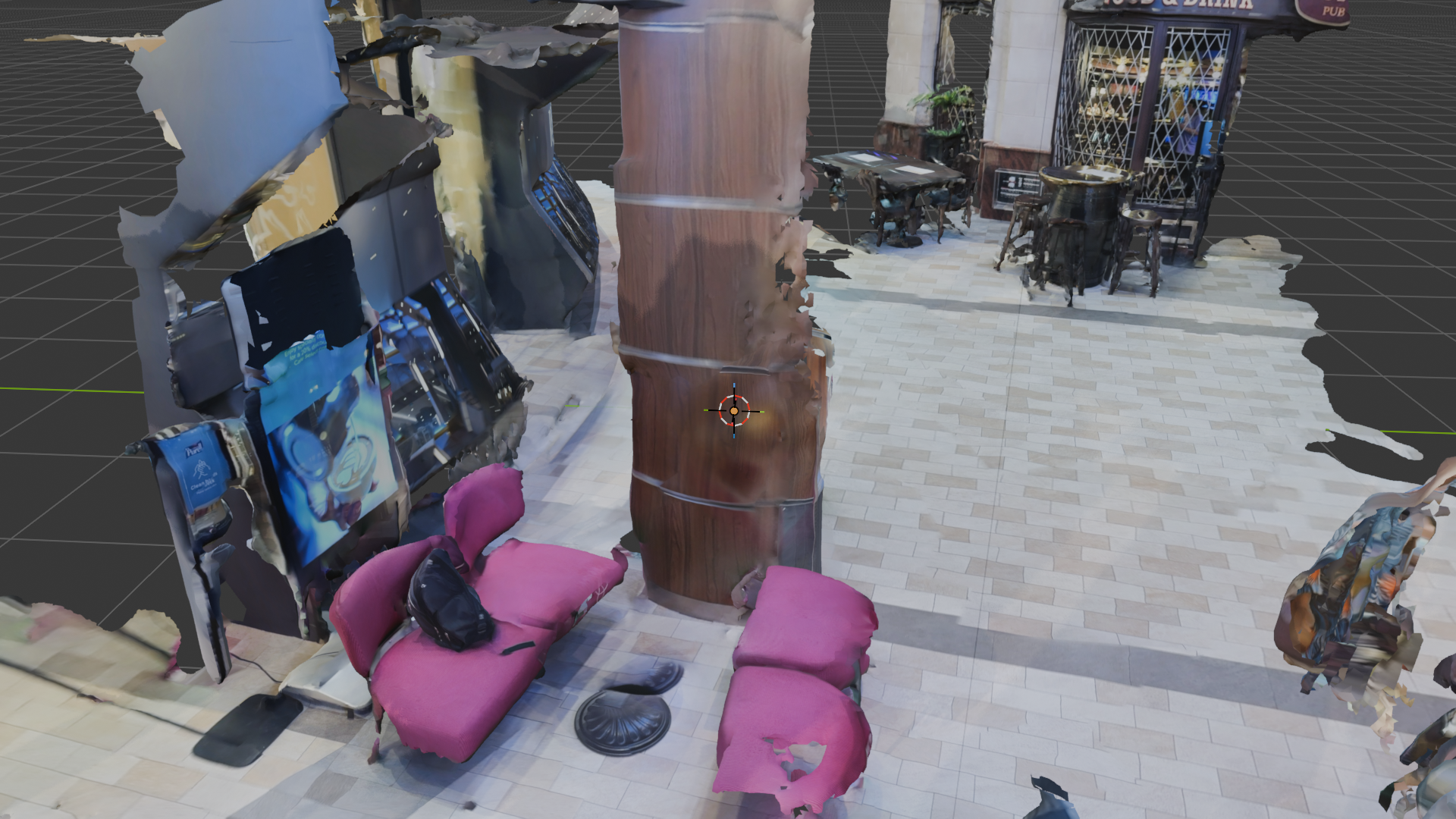
First-frame Blender render of the iPhone LiDAR scan: pink lounge chairs and a wood pillar in the Royal Caribbean Regalia promenade, captured with Scaniverse Classic mode, ~2-minute single sweep.

A cluster of pink lounge chairs and a wood pillar on the main promenade. Small enough to scan in one sweep, geometrically varied enough to test reconstruction, and a real place I happened to be standing in rather than a staged demo subject. Two-minute capture, launch to mesh on disk.

The scan came back patchy. Holes in the wall behind the chairs, the floor drops off in the foreground, one chair has a chunk missing from its back. That’s exactly what a first-attempt LiDAR sweep looks like when the operator walks at normal indoor pace instead of slowing down. I knew this in the abstract, but I’d never done it myself, so I made the canonical mistake and the canonical mistake is on the page now. I considered rescanning and decided against it. The patchy version is what every developer’s first attempt at this pipeline looks like, and it’s what makes the friction log below readable as a real workflow.

Friction notes (the actual DevRel content)

Every place I got stuck, what surprised me, what a doc-fix would be.

Scaniverse defaults push you toward the NEW (cloud + Gaussian splat) experience even when mesh + on-device is the right pick. The “Classic” option is the right answer for a USDZ → Blender → Omniverse workflow, but it’s visually de-emphasized. A less-experienced user would pick NEW and get stuck with splat outputs that don’t import cleanly into NVIDIA Omniverse Kit. Doc-fix: add a “which experience for which workflow” table to the getting-started guide.

Inside Classic, the Splat-vs-Mesh decision repeats the same trap. Splat is visually defaulted (orange gradient). Mesh is labeled only “more export options” with no hint that it’s the USDZ-compatible path. Doc-fix: annotate the modes with their downstream-tool compatibility.

First-time LiDAR scans are patchy because users walk at normal indoor pace. Scaniverse offers no in-app coaching during the sweep, no slow-down prompts, no coverage heat-map. Doc-fix: a 30-second “how to capture well” overlay on first launch would meaningfully improve first-scan quality.

Scaniverse USDZ exports with a deeply implementation-specific root prim name (e.g. Scaniverse_2026_05_31_101502). For downstream USD reference workflows you want stable, semantic prim names. Doc-fix: add a “root prim name” field to the export dialog, defaulting to scan title.

Blender’s first-time-render UX has three small frictions that stack. First: Blender renders from the scene CAMERA, not your viewport view, so the first render of an imported scan shows a random crop instead of what you’re looking at. Second: Blender has two distinct “View” UI elements: the View menu in the viewport header (which contains the right command, “Render Viewport Preview”) and the View tab in the N-panel sidebar (focal length, viewport lock). New users reach for the sidebar tab. Third: Blender 5.x renamed “Viewport Render Image” to “Render Viewport Preview”, so every tutorial older than this year uses the wrong name. Doc-fix: USD importer should optionally add a camera positioned to frame the imported bounds; the sidebar tab should be renamed “Viewport”; the 5.x changelog should prominently flag UI label changes.

Doing all of this from a cruise ship on satellite WiFi is a real-world DevRel constraint nobody’s blog post mentions. Cloud-GPU rentals become impractical. Offline-capable tooling (Scaniverse on-device, Blender local, usd-core CPU) is the only viable path. This validates the “Mac CPU is enough for the OpenUSD literacy track” hypothesis.

The cross-domain connection

The architectural pattern OpenUSD describes is the same architectural pattern model-driven network management has been describing for the last decade. Different vocabulary, different use cases, same load-bearing idea. Once you see it, you can’t unsee it.

In network automation, the canonical version of this lives in NSO and YANG. Model is the source of truth. Multiple teams extend it with additional opinions (YANG augments, service templates, layered configs) without anyone forking the source. Composed result is deterministic. The whole architecture exists because the alternative (every team writing imperative scripts that mutate device state directly) doesn’t scale.

OpenUSD says the same thing about 3D content. Stage is the composed source of truth. Composition arcs (references, sublayers, variants, payloads) let independent teams contribute opinions without forking the source asset. Composed result is deterministic. Same alternative, same scaling failure, just artists instead of engineers.

The three sharpest analogies:

  • OpenUSD Stage ↔ NSO’s CDB. Both are the composed source of truth that every other tool reads from non-destructively.
  • OpenUSD composition arcs ↔ YANG augment + NSO service templates. Mechanisms for stacking opinions without forking the source.
  • OpenUSD’s “non-destructive pipeline” framing ↔ model-driven network management. Declarative source of truth, deterministic merge of overrides, downstream tools never write back to the model.

The analogy lands at the architectural altitude and weakens in the specifics: USD’s LIVRPS composition ordering, time-sampled animation tracks, the Hydra render pipeline downstream all have no YANG analog. But for the first several hours of learning OpenUSD from a network-automation background, the NSO mental model accelerates the work considerably. The pieces I had to learn from scratch were the geometry-specific ones (Xform vs Mesh vs Material, Hydra rendering, USDZ packaging), not the architectural ones. That asymmetry is what makes the bridge useful.

What’s next

  • Read the LearnOpenUSD composition arcs chapter, then hand-rewrite the 01_references.py exercise from scratch.
  • Hand-write a compose_scene.py that references the cruise-promenade USDZ, adds a sublayer with one extra asset, saves the composed result back out.
  • Keep the friction log running.

Reach me on LinkedIn or via Sierra Code Co.
Hand-writing OpenUSD Python from the docs

Open full page

The previous post covered the scan-import-render pipeline. This one is about authoring USD by hand in Python so the abstractions stop being magic.

The shift

Day 1 was operating on USDZ (scan it, import it, render it). Day 2 is authoring USD by creating a stage from scratch in Python, defining prims one at a time, reading the .usda text format, and watching it change as I mutate the in-memory scenegraph.

This is the part where the OpenUSD bridge to network-engineering mental models starts paying off. The text format reads like a YANG-shaped tree. The Python API reads like NSO’s MAAPI. The composition arcs (next session) will read like NSO services + YANG augments. But you don’t see any of that until you’ve handwritten the API a few times. Working through LearnOpenUSD: Setting the Stage (seven pages, around 90 minutes if you read carefully and run every snippet).

What clicked

The moment OpenUSD stopped feeling like a mystery was the moment I opened a saved .usda file in a text editor for the first time. I’d assumed USD was some opaque binary format you only interacted with through tooling. It’s not. The native authoring format is human-readable text, the syntax is a hierarchical tree of typed prims with attributes, and the whole thing reads like a YANG document that happens to describe geometry instead of network config. Once I saw the text, the Python API made sense. The API is just a procedural way to author the same tree I could have typed by hand.

The other thing that clicked: there’s no substitute for typing the API out a few times. I’d spent the previous week watching Omniverse YouTube content and reading documentation, which gave me vocabulary but not muscle memory. Writing stage = Usd.Stage.CreateNew(path) and watching the .usda file appear on disk produced more understanding in 20 minutes than the previous week had.

Where the network-engineer mental model genuinely accelerates the first day of OpenUSD work:

  • Source of truth lives in the model.
  • You compose opinions rather than overwriting them.
  • The text format is what you diff and version-control.

These all map cleanly onto how NSO and YANG work. I wasn’t learning new architecture, I was learning a new vocabulary for an architecture I already had.

Where it stops accelerating: USD’s geometry-specific schemas (Xform, Mesh, Material, UsdShade, UsdLux) have no NSO analog. USD’s time-sampled attribute values have no YANG analog. USD’s Hydra rendering layer is a whole separate concern downstream of the authoring model. Knowing where the bridge stops is as useful as knowing where it starts. It tells me where to budget the learning hours.

Stage lifecycle: three constructors, one save

Usd.Stage.CreateNew(path)    # new file, errors if exists, writes empty .usda immediately
Usd.Stage.CreateInMemory()   # scratch stage, no file at all
Usd.Stage.Open(path)         # load existing into memory
stage.Save()                 # flush in-memory mutations to disk

Mirrors Python’s open(path, 'w') / open(path, 'r') lifecycle. The thing I missed for a few minutes: mutations are in-memory only until you call .Save(). CreateNew writes an empty file at creation time, but anything you DefinePrim afterward sits in memory until saved.

Network analogy: CreateNew ≈ initialize and commit an empty candidate config; Open ≈ pull running-config into a candidate; Savecommit after edits.

DefinePrim(path, type): one thing’s arbitrary, one isn’t

stage.DefinePrim("/World/Chair", "Cube")
#                  ^              ^
#                  path (yours)   type (USD's)

The path is whatever you want. The type has to be a schema USD knows (Xform, Cube, Sphere, Mesh, Material). Pass an unknown type string and the prim survives but has no schema methods attached. Auto-create behavior: DefinePrim("/A/B/C", "Cube") silently creates A and B as typeless prims if they don’t exist. Convenient, but easy to miss.

Network analogy: path is the XPath in a YANG datastore (/interfaces/interface[name='Eth1/1']), author-chosen. Type is the YANG container or leaf type definition, drawn from a fixed registered model. You can’t def Banana for the same reason you can’t have a YANG leaf of type banana without first defining the typedef.

Python type annotations aren’t enforcement

stage: Usd.Stage = Usd.Stage.CreateNew(file_path)

The : Usd.Stage is decoration. Documentation for IDEs and mypy, ignored by the runtime. You can delete it and the program runs identically. You can also lie (stage: int = ...) and it still runs. One of those Python gotchas that hits everyone from a typed-language background.

What .usda text actually looks like

After authoring a few prims by hand and saving:

#usda 1.0

def Xform "World"
{
    def Cube "Chair"
    {
    }
}

That’s it. def keyword, type, name, body. Hierarchy is nested braces. Every line maps 1:1 to a Python API call. The text format is the canonical wire-format of USD: what gets diffed, version-controlled, and code-reviewed. This is the part that maps cleanest onto YANG: declarative, hierarchical, schema-typed, plain-text-canonicalized.

Friction notes

OpenUSD’s Python API breaks PEP 8. Methods are CapitalCase, not snake_case. Standard Python would write stage.create_new(...). OpenUSD writes Stage.CreateNew(...) because the Python bindings preserve the C++ API’s naming. Every Python tutorial outside the Pixar and NVIDIA ecosystem trains the opposite convention. Doc-fix: the “Setting the Stage” intro could call this out: “Note for Python developers: USD’s Python bindings preserve the C++ API’s CapitalCase naming. This is intentional but breaks PEP 8 expectations.”

Usd.Stage.CreateNew is exclusive-create and silent on rerun. Iterating on the hello-world script fails the second run because the file already exists. Fix is rm between runs, switch to Open, or use CreateInMemory for iteration loops. Doc-fix: teach the three-call cheatsheet upfront in the lesson, not buried in the API reference. Right now CreateNew is taught first as if it’s the normal entry point. For an iteration workflow it’s the wrong one.

The cross-domain connection (still load-bearing)

The day-1 analogies stack continues to hold:

  • OpenUSD Stage ↔ NSO CDB: composed source of truth.
  • DefinePrim path/type split ↔ XPath + YANG typedef: author-chosen path, registered-schema type.
  • .usda text format ↔ YANG declarative tree: hierarchical, plain-text-canonicalized, diffable.
  • Save() semantics ↔ NSO commit: until then, mutations live in candidate only.

The mental-model accelerator runs for the first ~80% of the surface area, then you need to re-tool for the parts that are genuinely USD-specific.

What’s next

Tomorrow: Composition Basics (Layers → References → Strength Ordering), then redo 01_references.py by hand. That’s the chapter where the “single source of truth” / “non-destructive pipeline” terminology I keep hearing from NVIDIA’s Physical AI talks finally becomes operational.


Reach me on LinkedIn or via Sierra Code Co.
intermission

Intermission: Cisco Live, off the NVIDIA prep track

Open full page

A learning-in-public log is more useful when it tells the truth about which days had work in it and which days did not. Today and tomorrow are two days that did not.

I’m at Cisco Live this week presenting on network-automation topics that were committed to long before the NVIDIA Physical AI ramp started. The presentations are the day job, the prep is the side project, and when the two collide the day job wins by default. That’s the right call but it does leave a gap in this journal, and the right way to handle the gap is to mark it as a gap rather than pretend it didn’t happen.

Back to the OpenUSD work on Thursday. The cruise scan, the USD Python session, and the second hotel scan all sit on top of each other as continuous learning. The two-day pause doesn’t undo any of that, but it does push the composition-arc work and the Isaac Sim exposure into the back half of this week instead of the front half. The timeline is the timeline.

If you’re reading this looking for actual OpenUSD content, the Day 1 cruise scan entry and the Day 2 USD Python entry are where the work is. The next real entry lands Thursday.

intermission

Intermission, day 2: Cisco Live, still off-track

Open full page

Second of the two-day Cisco Live gap. Same caveat as yesterday. The honest answer to “what did you work on today for the NVIDIA prep” is “nothing, I was presenting at a different conference.”

The interesting bit is what comes after this gap. Two things landed during the intermission that change the back half of the week. First, the NVIDIA contact I’ve been preparing for sent a confirmation for Monday’s call, which means the runway is now finite and known. Second, recent posts from that contact made it explicit that the team’s public-facing thinking is robotics-first with OpenUSD positioned as the digital-twin substrate, not OpenUSD-first.

That means the back half of this week pivots. The plan was to keep going on hand-written OpenUSD Python and composition arcs. The revised plan is to spin up Isaac Sim in the browser via NVIDIA’s hosted launchable, get a robotics-flavored demo running on top of the existing real-to-sim scan work, and use the friction notes as the actual DevRel artifact.

This is the part of learning-in-public that feels uncomfortable to admit but is worth saying out loud. The plan you ship with on Monday is rarely the plan you finish with on Friday. Friday morning’s new information rewrites Friday afternoon’s plan. The discipline isn’t having the right plan up front, it’s recognizing fast enough when the plan needs to change.

Back to actual work Thursday. The next real entry is the second hotel scan plus the meta-lesson on second-iteration friction.

From zero Isaac Sim to a cloud-streamed robotics + real-world-scan composition in one day

Open full page

The pivot from authoring USD by hand on a MacBook to running NVIDIA’s robotics simulation stack on a cloud L40S, with a real-world iPhone scan composed alongside an NVIDIA-provided robot in a single USD stage.

The pivot

The previous OpenUSD posts were about getting the substrate right. This one is about loading it into NVIDIA’s robotics simulator, training a robot in it, and proving the loop end to end. A line from a recent post keeps landing for me: digital twins aren’t a deliverable, they’re the precondition for iterating on real robots. You don’t cut metal until the robot has learned to walk in the metaverse. Fastest way to engage credibly with that is to actually do the loop at small scale. Three steps, one evening, under $30 of cloud spend. All three landed.

The afternoon: cloud cold-start to trained robot

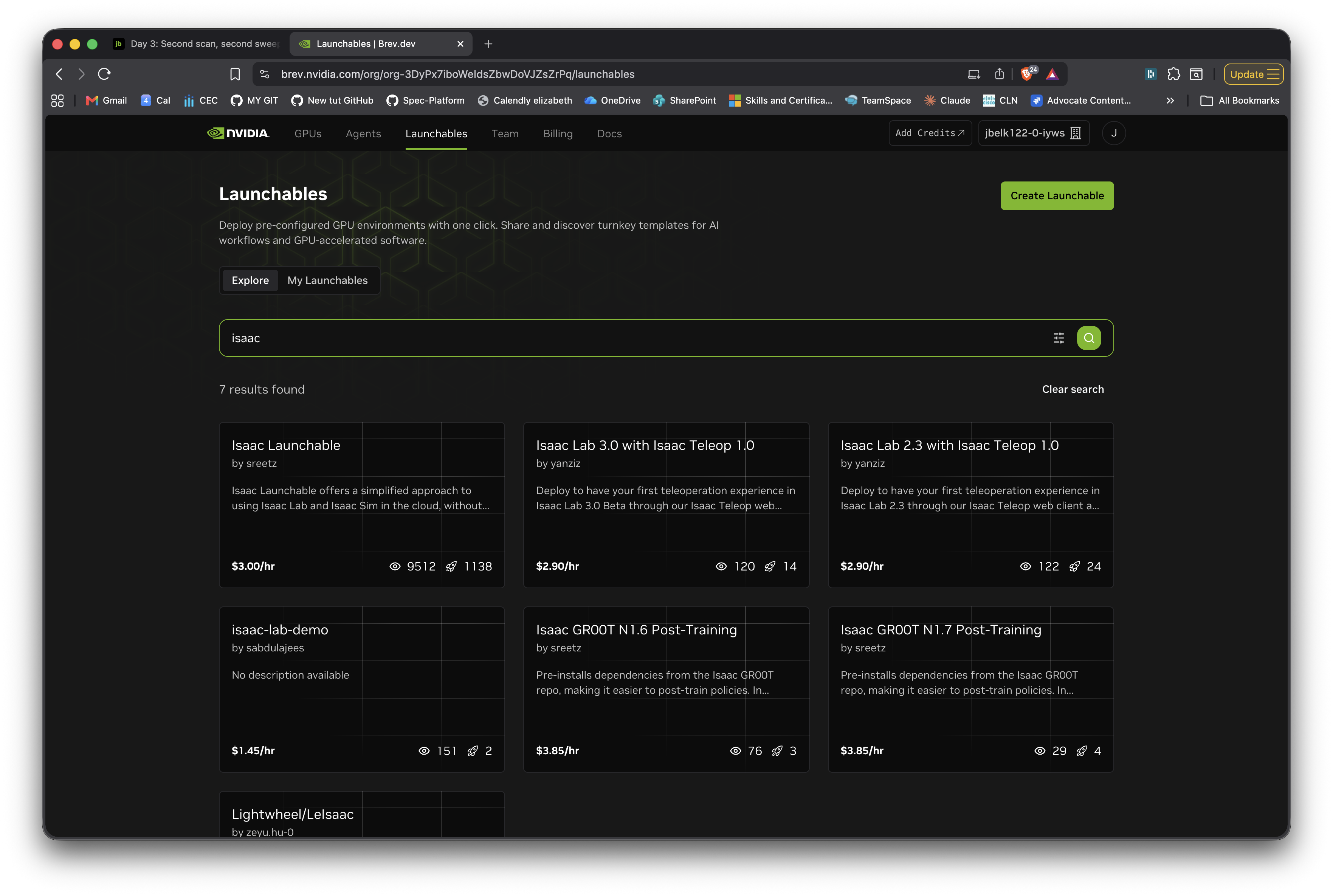
NVIDIA bought Brev (a GPU rental platform) since I last looked, and shipped the Isaac Launchable: one-click deployment of a containerized Isaac Sim 5.1 plus Isaac Lab 2.3 environment, browser-streamed via WebRTC from an AWS L40S. No local GPU required.

Brev's Launchables gallery, showing the Isaac Launchable by sreetz with over 1100 deploys.

First deploy is about 25 minutes (provisioning is fast; the bulk is shader-cache warm-up). Subsequent starts are much faster because the cache persists.

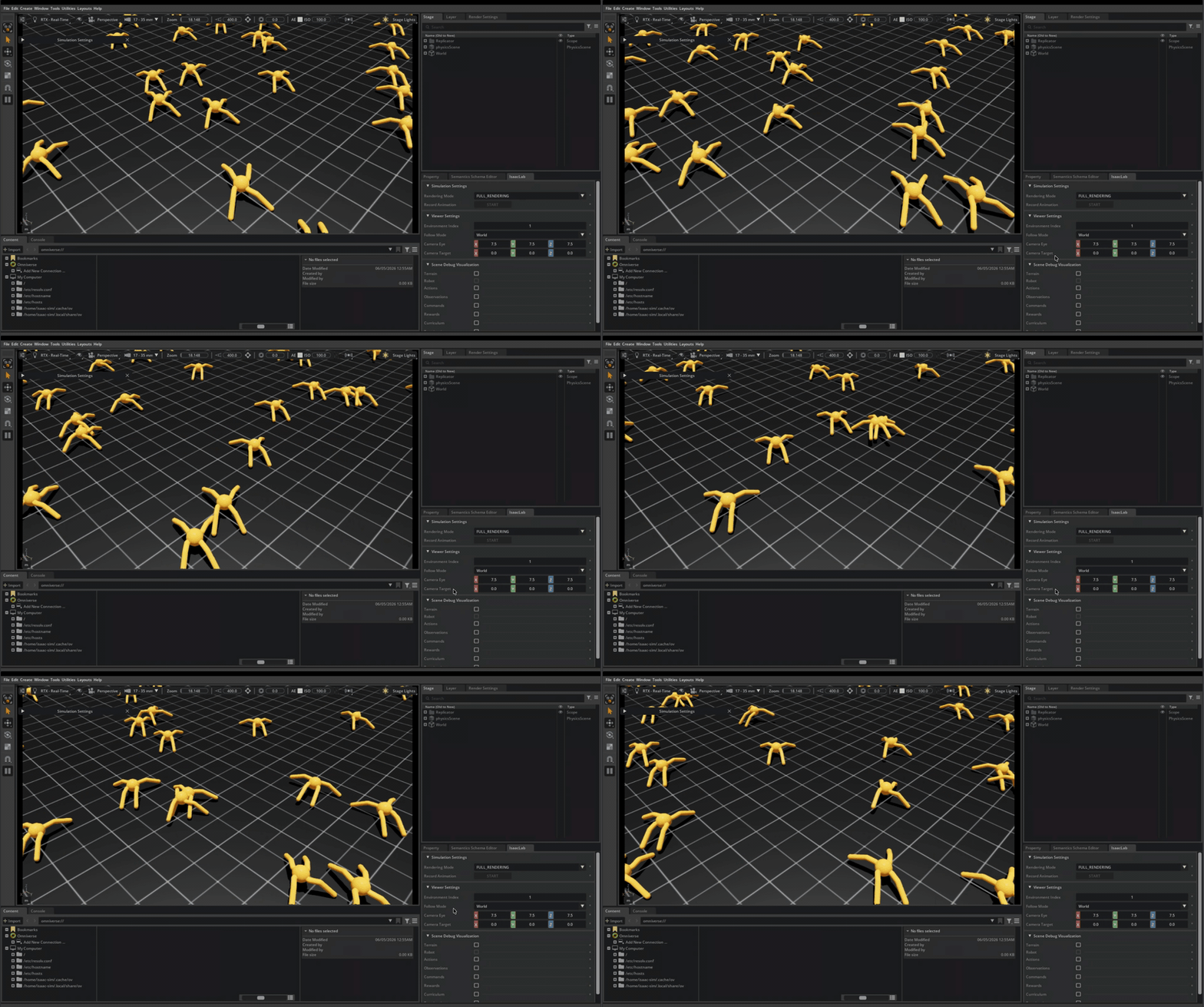
Once the streamed viewer was alive, I ran the canonical Ant locomotion task. 8000 PPO iterations across 4096 parallel Ant simulations in roughly 2 minutes of wall-clock time on the L40S. Trained checkpoint saved automatically. Cost so far: under $1 of compute.

The trained Ant policy running live: multiple Ants walking across a flat grid, each executing the same learned locomotion policy. ~7-second loop, captured from the browser-streamed Isaac Sim viewer.

Going from zero prior robotics-RL experience to a working quadruped locomotion policy in 2 minutes on a cloud GPU, for less compute spend than a coffee. That’s the cost-per-experiment story behind why robotics R&D has been moving the way it has the last couple of years.

The evening: composing the real-world scan with the robot

Training the Ant on flat ground proves you can do robotics on the cloud. The more interesting bit is bringing real-world geometry in alongside it. That’s where the OpenUSD work from the previous posts connects.

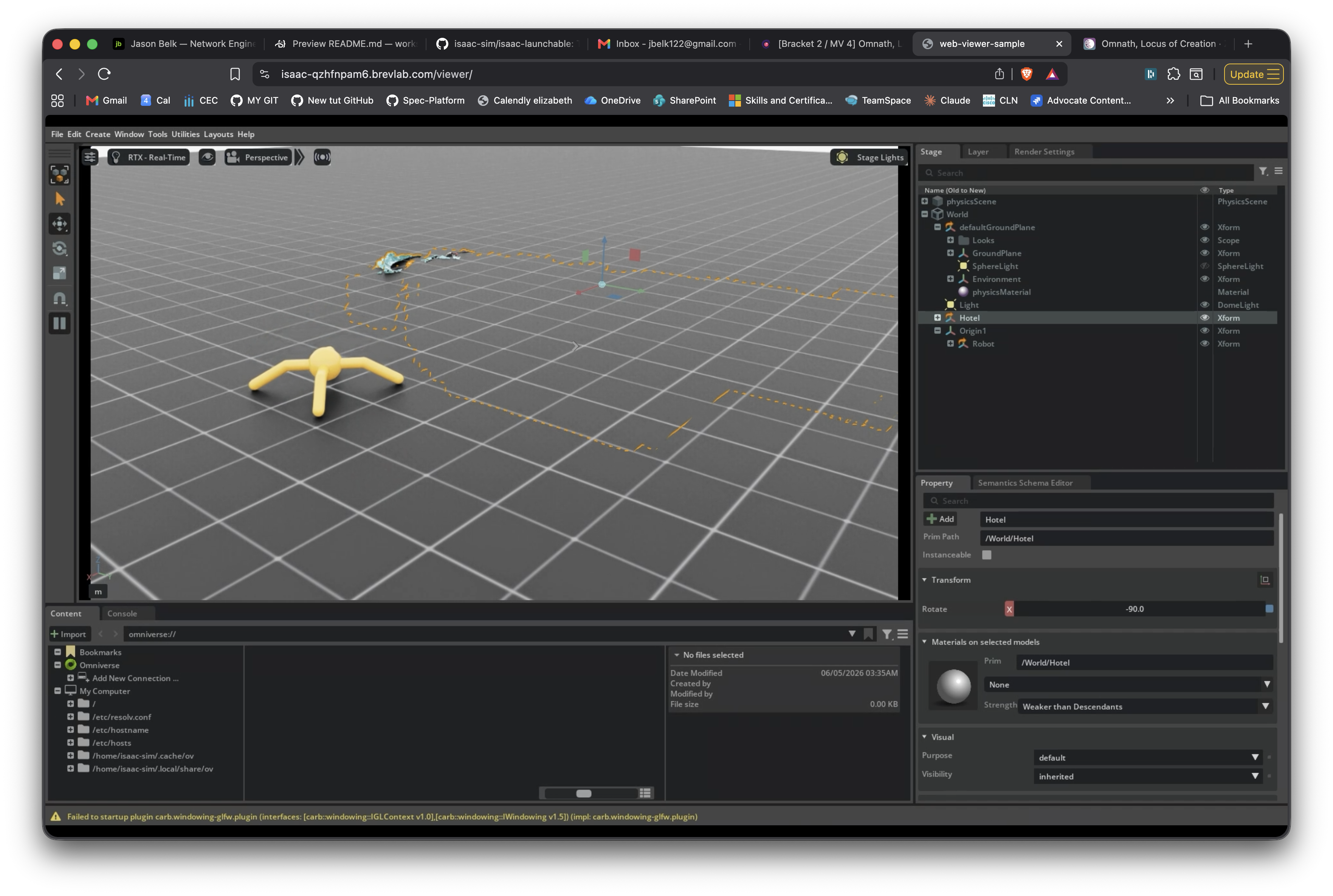
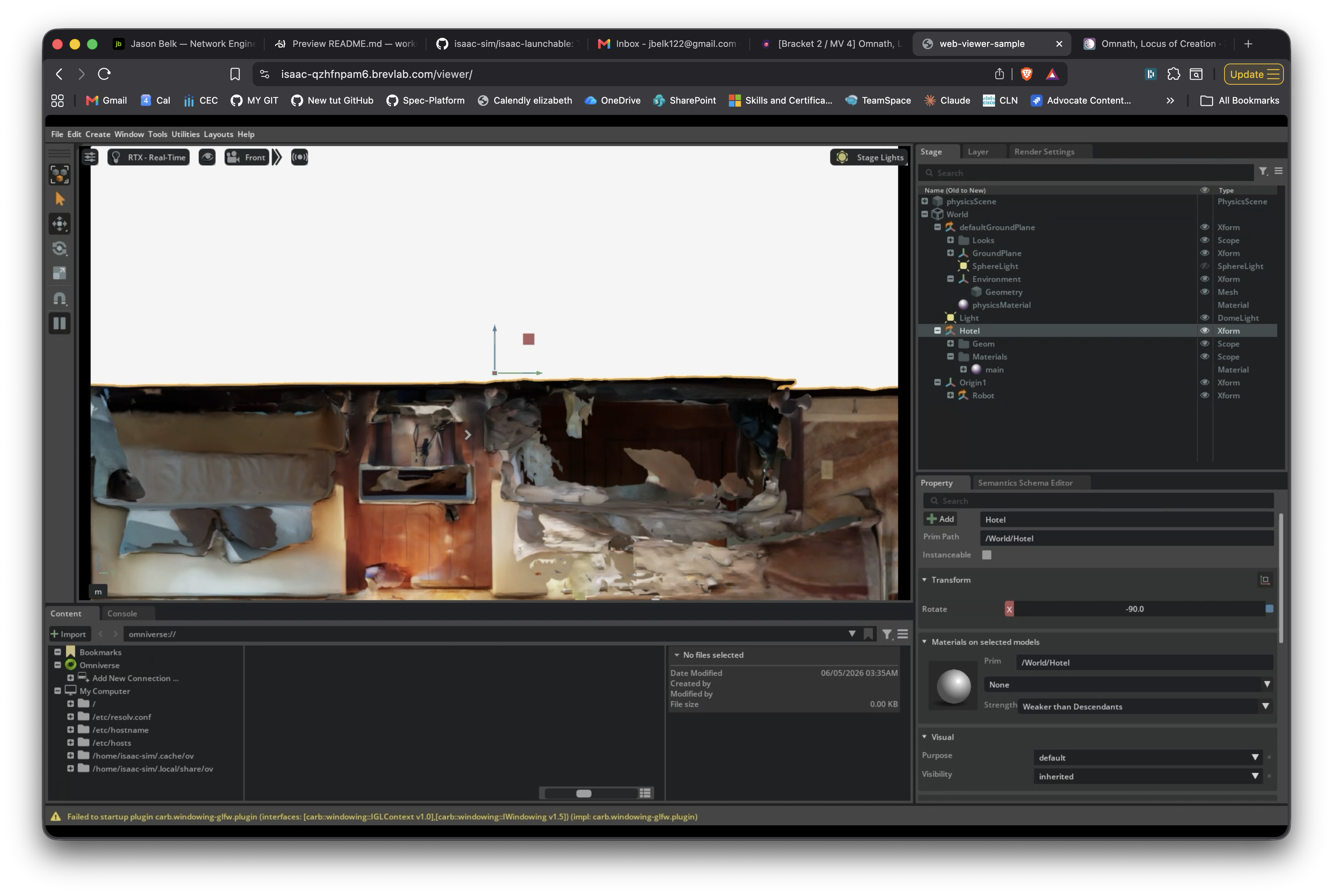
I uploaded my hotel scan from the previous post (hotel.usdz, an iPhone LiDAR capture exported by Scaniverse) into the running Isaac Sim instance, wrote a Python script that referenced both the hotel and the NVIDIA-provided Ant robot into a single USD stage, and rendered the composed scene via the same browser-streamed viewer.

Composition: trained NVIDIA Ant robot standing on a generated ground plane with the hotel scan visible behind. Both authored into a single USD stage in Python.

Hotel and Ant are both authored as USD references into one stage. The Hotel gets a 90° X rotation to flip Scaniverse’s Y-up convention into Isaac Sim’s Z-up, plus a translate to lift its floor to match the ground plane. The Ant lives under an Xform parent at /World/Origin1/Robot, which is the canonical Isaac Lab prim-path pattern. A DomeLight provides ambient illumination so the Ant’s PBR materials read correctly.

Hotel scan rendered in Isaac Sim from the Scaniverse-expected front angle. Bed, walls, dresser, ceiling visible.

The friction notes that matter

Short list by design. Three are filed as a single GitHub issue against isaac-sim/isaac-launchable. They’re documentation and UX gaps observable in the first 30 minutes of any cold-start deploy, before writing any custom code. One more is out-of-scope-for-the-launchable but worth noting.

The in-instance README points to a directory that doesn’t exist at the host level. The README says cd /workspace/isaaclab && ./isaaclab.sh -p .... That works in the web VS Code terminal. SSH in via brev shell <instance> and the closest-named directory on the host is ~/isaac-launchable/isaac-lab/ (with a hyphen) and it contains docker-compose infrastructure files, not the framework. The framework lives inside a container. Web users succeed; SSH users get “no such file or directory” or wander into the wrong directory. Doc-fix: unify the directory names across README, web VS Code mount, and host filesystem. Filed as issue #10.

The in-instance README and the GitHub README disagree on the hello-world. GitHub’s positions Ant RL training as the canonical first-run example. The in-instance one positions create_empty.py instead. Both demos work; both make sense as introductions. But reading one before deploying and the other after, you have no way to know which “first step” to follow. Doc-fix: pick one canonical first-run and use it consistently across both READMEs. Filed as issue #10.

Web VS Code opens a generic Microsoft walkthrough as the first tab, not the launchable’s README. Deploy completes, you open the web VS Code URL, and the first tab is “Get Started with VS Code for the Web” (theme picker, command-palette intro, nothing about Isaac). The launchable’s actual README isn’t surfaced until you manually close the walkthrough. For a paid first-time launchable, that’s a wrong default. Doc-fix: one code-server settings change to dismiss the walkthrough and open README.md instead. Filed as issue #10.

Isaac Sim 5.1 renamed the omni.isaac.* Python namespace to isaacsim.*. Every tutorial, blog post, and Stack Overflow answer published before the rename uses the old namespace and emits a wall of deprecation warnings on first run. The launchable’s README doesn’t link the migration guide. New users following any external tutorial hit this immediately. Doc-fix: the README’s first paragraph should add a one-line pointer to the namespace migration guide. Not filed against the launchable since it crosses the upstream Isaac Sim boundary.

What this means

Getting this loop working in one evening on a cloud GPU for under $30 told me one thing: the friction left in the path is documentation and onboarding, not capability. Hardware works, simulator works, training works, composition works. Where I got stuck was almost always “the canonical pattern isn’t surfaced in the launchable’s docs, only in upstream Isaac Lab examples.” That’s a fixable problem, and it’s the kind of work I’ve spent 14 years on the DevRel side of.

The three first-deploy friction notes above are filed at issue #10. The custom-script friction I hit later (ISAAC_NUCLEUS_DIR = None, prim_path needing an Xform parent) traces back to my own deviations from the canonical IsaacLab pattern, so those were left out.


Transparency note: the OpenUSD work in the previous posts was hand-written, because the goal was building a real mental model of USD. Today was different. The Isaac Sim cold-start scripting, Articulation API debugging, and scene composition all leaned on Claude Code. Timeline plus operational complexity: I had the USD assets ready, needed the cloud pipeline working in one evening, and the debugging surface (Isaac Lab APIs, USD instancing semantics, Hydra rendering, carb settings, the launchable’s containerized layout) was bigger than I’d plausibly poke at by hand in that window. The friction notes are mine, hit in real time. The Python plumbing was AI-assisted.

Reach me on LinkedIn or via Sierra Code Co.
Second scan, second sweep, second class of friction

Open full page

The first OpenUSD post covered a patchy cruise-ship scan. The second was hand-writing USD Python. This one is iterating the scan pipeline now that the muscle memory is there, and discovering that “second-iteration friction” is a different class of problem entirely.

Applying the lesson from day one: slow down

Day 1’s friction-log entry #3 was: “First-time LiDAR scans are patchy because users walk at normal indoor pace.” The fix was: slow down, keep the phone at chest height, stay within 1-2m of surfaces, sweep side-to-side. Today I tried it on a hotel room.

It worked. The mesh came back dramatically more complete: bed, dresser, lamp, TV, painting, even the dim corner near the bathroom door reconstructed cleanly. Compared to the cruise-promenade scan (chairs and railings only, missing chunks of wall and ceiling), this looked like a different category of capture.

What “slowing down” actually feels like during a real scan is uncomfortable. You stop near each surface, hold the phone steady, sweep it side to side deliberately, then move to the next surface and repeat. It feels performative and weird, and there’s no in-app feedback telling you whether the coverage is good until processing finishes. Day 1 framed the missing feedback as a documentation problem. After actually doing it, I think it’s more than that. The app needs live coaching during capture. The technique is counterintuitive enough that doc-reading alone doesn’t change behavior.

Your first attempt at any new sensor-driven workflow is calibration data, not output. The cruise-ship scan wasn’t bad work; it was the right kind of work to do first, because it produced the friction notes that told me what to change.

What I scanned

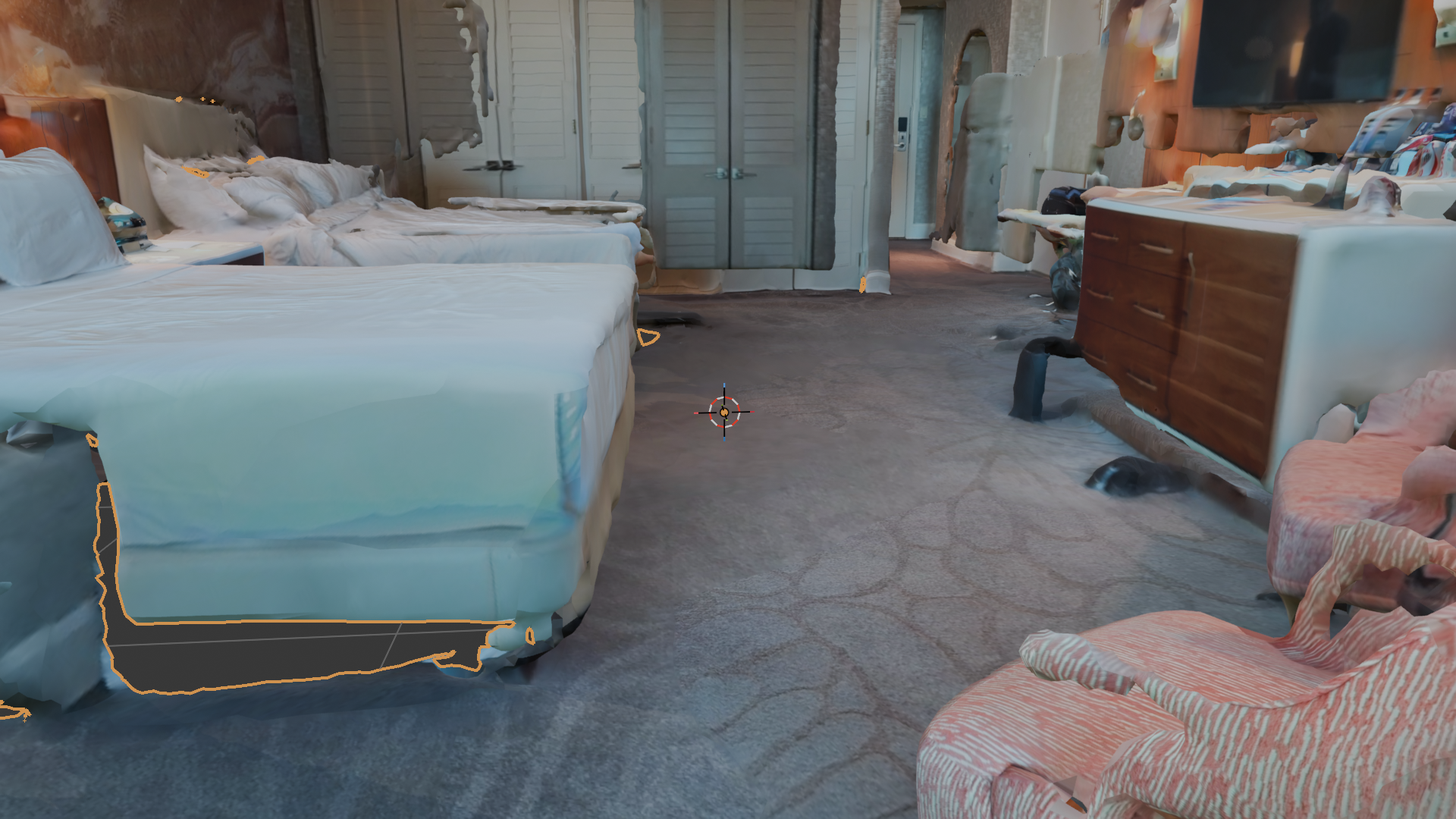
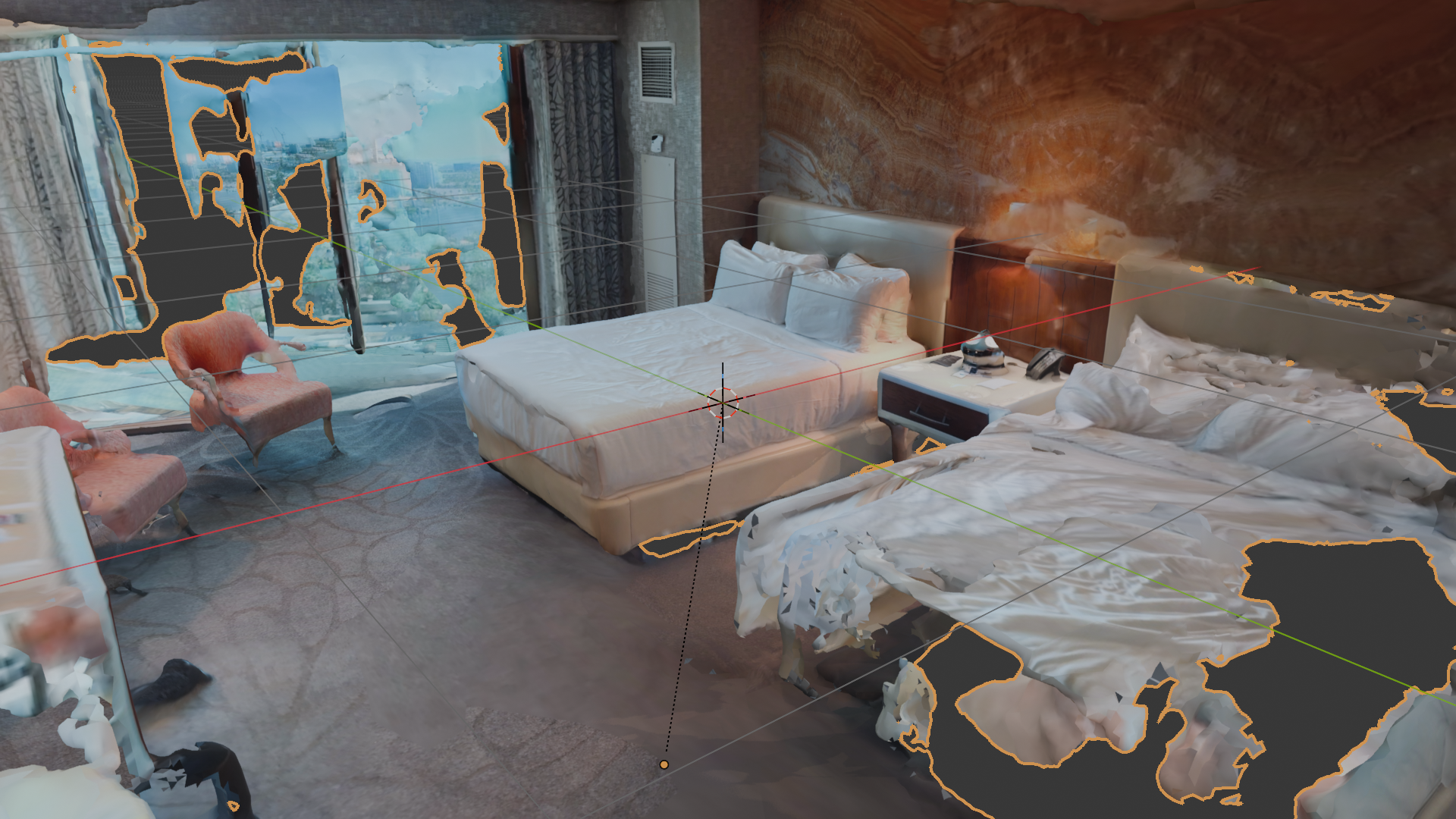
Interior viewport render of the hotel room scan in Blender 5.1.2 with Material Preview shading. Camera positioned low near a corner, looking across the room: bed with white linens in the foreground, dresser with a TV on the right wall, painting and framed door in the background.

The improvement isn’t subtle. The bed reconstructs as a continuous surface instead of patchy fragments. The dresser keeps its right-angle edges. The painting on the wall retains enough texture detail to read as a real painting and not a smeared blob. The lamp on the nightstand survived with its shade intact. Most important variable was capture pace; second most was staying within about a meter of surfaces.

The new failure mode

The improvement surfaced a problem the patchy day-1 scan didn’t have, because the patchy day-1 scan never tried to be a complete room.

I wanted an external screenshot looking down into the geometry from above. The scan included the ceiling, correctly, because rooms have ceilings. The ceiling makes the room a closed box from any external angle. Every external screenshot just shows the top of a featureless white volume.

The standard Blender fix is to hide the ceiling faces. Edit Mode, Face select, hover over a ceiling face, press L to select all linked faces. Expected: the whole ceiling lights up. Reality: maybe 5 to 10 percent lit up, because the scanned ceiling isn’t one continuous mesh. It’s dozens of fragmented islands separated by tiny holes from places the scan didn’t capture cleanly.

External view of the same hotel scan in Blender, looking down at the room from outside. The ceiling reconstructed as a mostly-continuous surface, with a few visible holes. Walls and floor are visible at the edges, but the ceiling occludes the actual contents of the room.

To actually select the whole ceiling I’d need to repeat L 20-30 times, or write a Python snippet that selects all faces above a Z-threshold (works, but is gatekept behind “know Blender’s Python API”). I gave up on external screenshots. The interior camera angle (low, near a corner, looking diagonally across the room) renders beautifully and doesn’t require any geometric surgery. The fix was to not try.

Second-iteration friction is a different category from first-iteration friction, and most tutorials only cover the first kind. First-iteration friction is about getting any output at all: install, fight defaults, capture, file on disk. Day 1’s notes were almost entirely this category. Second-iteration friction is about getting the output to be useful for whatever comes next downstream. Tutorials rarely cover this, because it’s workflow-specific and the tool authors don’t know which downstream you have in mind. The honest version of a learning log goes further than attempt one.

Friction notes

Room scans with ceilings make external screenshots impossible, and the obvious DCC-tool fix doesn’t work. Scaniverse-output USDZ ceilings come back as fragmented mesh islands (holes break geometric continuity), so Blender’s “select linked” can’t grab the whole ceiling in one shot. You’d have to L dozens of pieces, or write a Python snippet to select by Z-threshold. Doc-fix: Scaniverse should optionally export ceiling, floor, and wall as separate prims in the USDZ so downstream tools can toggle visibility without geometric surgery. The whole real-estate and digital-twin workflow needs this. It’s a one-line classification step at export time.

“Just slow down” is the right answer for capture quality, but the docs framing buries it. Scaniverse’s getting-started flow treats every scan as equivalent. A real-world DevRel-shaped framing would be: “Like any new sensor workflow, your first 2-3 scans are calibration data. Here’s what you’ll learn from each one.” Doc-fix: add a short “first-scan expectations” page to the onboarding flow, with side-by-side examples of patchy-vs-complete coverage.

What this tells me about real-to-sim

The reason this matters for an NVIDIA Physical AI conversation isn’t the screenshot. It’s that the gap between “a scan exists” and “a scan is useful as a digital twin” is mostly about classification metadata, not geometry.

Geometry quality is solved. Modern phone LiDAR plus modern mesh reconstruction produces meshes good enough for downstream simulation. What’s not solved is the workflow assumption that scan outputs should arrive with semantic labels (ceiling, floor, wall, furniture, window) so Blender, Omniverse, and Isaac Sim can act on them surgically.

This is the kind of “boring infrastructure that unlocks the cool demo” problem network-engineering DevRel has spent the last decade on. NetBox didn’t take off because it stored device data; it took off because it provided the classification structure every other automation tool could read from. The same pattern feels missing in real-to-sim right now.

OpenUSD is positioned to be the classification substrate the real-to-sim workflow needs. The work to make that happen isn’t technically interesting work: it’s data-modeling work, schema work, convention work. Deciding that “Wall” and “Ceiling” and “Floor” and “Furniture” are first-class concepts that should appear as typed prims in the USD output of a room scan, instead of letting the room come back as one anonymous mesh that downstream tools have to re-segment by hand. Pixar built USD for film and animation, where assets arrive with deep manual classification baked in by artists. The real-to-sim use case inverts that. Assets arrive raw from a sensor and need automated classification on the way in. The schemas for that classification are an unsolved problem; the convention layer on top is even less solved.

Different vocabulary, different reference architectures, same load-bearing idea. Classification metadata is what unlocks the workflows everyone wants to do. Network automation spent 10 years figuring that out for infrastructure work.

What’s next

  • Composition Basics chapter from LearnOpenUSD, then hand-redo 01_references.py.
  • Hand-write compose_scene.py that references the cruise-promenade USDZ AND a primitive composed on top. The “non-destructive pipeline” demo in its smallest possible form.

Reach me on LinkedIn or via Sierra Code Co.
Off the hands-on track: the GTC Taipei keynote through a network engineer's lens

Open full page

Yesterday’s plan was the weekend centerpiece: get the cruise-promenade scan into Isaac Sim next to a Franka arm. Yesterday was actually a flight home from Cisco Live in Vegas and setting up my daughter’s 6th birthday party. The day job and the family calendar both outrank the side project, and a learning-in-public log is more useful when it says that plainly. No Isaac Sim, no friction log today.

The one piece of NVIDIA work I did get was the GTC Taipei keynote, start to finish, all 2 hours of it. Watching a keynote isn’t building anything. But this one maps the exact territory I’ve been ramping into, so the notes are worth keeping. Three things landed hard, and all three landed because of where I’m coming from rather than because they were the loudest announcements.

Vera Rubin, and the data center that gets built in a digital twin first

Vera Rubin is in full production and ships this fall. It’s an end-to-end system, not a single GPU: Rubin GPUs, the new Vera CPU, the storage and networking trays, all designed together. The silicon is the headline everyone will quote.

The part that actually stopped me was a workflow, not a chip. NVIDIA showed designing and validating an entire Vera Rubin AI factory in an Omniverse digital twin before a single rack lands: the layout, the power, the cooling, the network fabric, every integration tested in simulation first. They’ve named the blueprint DSX. The pitch is that a factory now running 50 to 100 billion dollars per gigawatt has to work the first time, so you prove it out in software before the concrete cures.

That’s the same shape as work I’ve done for years. You model the topology, simulate the behavior, validate the integrations against the model, and only then do you cable anything in the real room. Network automation has been calling that a digital twin of the network for a while now. NVIDIA is doing it one layer out, for the building the network lives in: power, cooling, racks, and the spine all validated before anything is racked.

Here’s the connection that made the last week of my own work click into place. The substrate under that whole demo is Omniverse, and Omniverse is OpenUSD. The thing I’ve spent this week authoring by hand on a MacBook is the same composition layer NVIDIA uses to assemble a gigawatt-scale factory in simulation. Different scale, same file format, same non-destructive composition model I wrote about in the cruise scan entry. That’s the moment the OpenUSD ramp stopped feeling like a side quest.

Alpamayo 2, and 6 months of letting the car drive

NVIDIA announced Alpamayo 2 Super, a 32-billion-parameter open reasoning model for autonomous vehicles, and called the result the first reasoning autonomous vehicle. The demo narrated its own decisions out loud: nudge left due to the stationary vehicle ahead, yield to the pedestrian in our lane, keep distance to the cut-in vehicle merging from the left.

I have a specific lens on this one. My wife and I have a Model Y we got in January, and we let it drive almost everywhere, both of us, every day. That narration describes out loud what my car already does silently 100 times a commute. I’m a daily user, not an AV engineer, so I can’t speak to the stack underneath. What I can say is that the thing NVIDIA is selling here, the reasoning being legible in language instead of staying a black box, is exactly the thing that would change how I trust the car. When FSD does something I don’t expect, the missing piece is always the why. A model that can state the why, for safety validation and for regulators, is a genuinely different thing to live with than the one in my driveway.

Cosmos 3 and Isaac GR00T: the data problem, and the simulator that answers it

Jensen framed physical AI’s hard problem as data, and the framing was clean. Language models trained on all the text humans wrote and read, from our perspective. Robots need data from the robot’s own perspective, first-person, and almost all the video in the world is third-person. So you climb a ladder: teleoperation (human demonstration), then simulation, then world foundation models that generalize across any viewpoint.

Cosmos 3 is the foundation model for that middle-and-top of the ladder. It’s a mixture-of-transformers design, a reasoning transformer feeding a generation transformer, trained on 20 trillion tokens of multimodal data, shipped open in a high-accuracy “super” size and a fast “nano” size. It can act as the perception model, the world simulator, or the policy itself.

This connected straight to the Ant I trained in Isaac Lab earlier this week. That was simulation as a bootstrap for a control policy at toy scale, an evening and under a dollar of compute. Cosmos 3 is the same idea at frontier scale: when real-world data is impossible to collect, compute becomes the data. Having done the small version of that loop by hand, the big version reads as a continuation instead of a slide.

NVIDIA also announced an Isaac GR00T reference humanoid robot aimed at academic labs: a Unitree H2 Plus chassis, Sharpa five-finger hands, a Jetson Thor brain, roughly 6 feet and 150 pounds, running the full Isaac GR00T software stack. The interesting move there is a developer-experience one. A reference design takes a research lab from months of stitching together simulators, teleop rigs, and data pipelines down to hours. That’s a removing-setup-friction play, and it’s the kind of thing I pay attention to as a DevRel problem rather than a hardware one.

I’ll be honest about the edge of my understanding. The architecture details are where I’m still building intuition. Mixture-of-transformers, and the state-space-plus-mixture-of-experts hybrid in the Nemotron 3 Ultra model they also shipped: I can follow what each piece is for, but the why-it-works at the math level is a newer muscle for me, and watching a keynote is not the same as understanding the model. That gap is exactly what the cert study on my calendar is for.

What I took from it

The repeated point across the whole keynote was that the same computing pattern keeps showing up: a model, a harness that orchestrates it, tools with skills, and a runtime, whether that runs in the cloud, on a PC, in a car, or in a robot. For someone coming from network automation, the lesson underneath that was quieter and more useful. The leverage keeps landing in the same place I’ve already worked: the modeling layer, the single source of truth, and the validate-before-you-deploy step. The silicon gets the headline. The part I’d actually work on sits one layer down, in the modeling and validation workflow, and that layer already looks familiar.

What’s next

  • Back on the hands-on track this weekend: cruise-promenade USDZ into Isaac Sim alongside a Franka arm.
  • Keep the friction log running once I’m building again.

Reach me on LinkedIn or via Sierra Code Co.
latest

Putting a robot in my own office with Cosmos 3, 5 days after it shipped

Open full page

Yesterday’s entry was about watching the GTC Taipei keynote and writing down what landed. Cosmos 3, NVIDIA’s open world foundation model for physical AI, was the announcement I most wanted to get my hands on. Today I did. By the end of an afternoon I had it self-hosted on a rented H200, generating video of a humanoid robot walking through a scan of my own office.

Two honest notes before the work. First, this was the AI-assisted half of how I split my learning. The OpenUSD posts on this site were done by hand, slowly, so the mental model would stick. This one was the opposite: I drove a coding agent to handle the SSH, the Docker, and most of the prompt iteration on a cloud GPU, and I steered. I’ll mark where that line falls, because the line matters. Second, the result is rough in places, and the rough parts are the most useful part of the writeup.

What I wanted: a frame in, physics-aware video out

Image-to-world generation is the part of Cosmos that I find genuinely new. You hand the model a single still image and a text prompt, and it generates a short video of plausible motion forward from that frame. It produces actual dynamics, gravity, momentum, a robot shifting its weight, instead of panning a camera over a static picture.

Cosmos 3 ships as two halves. A reasoner that watches a scene and answers in text, and a generator that produces the video. The reasoner is the front of every pipeline, and it’s free to try on build.nvidia.com. I fed it a clip of two robot arms packing a box and asked what happens next. It reasoned through the scene and answered: the right arm places the white object into the box. That’s the understanding half working, with zero setup.

The generator is the half that makes the video, and that’s the half that needs a GPU.

The reasoner is free, generation needs a GPU

NVIDIA’s hosted generator endpoint isn’t live yet, so I self-hosted. A single H200 on Brev, the vllm/vllm-omni:cosmos3 Docker image, an OpenAI-compatible API on port 8000. Roughly $4 an hour.

Standing up the server was the familiar part. A container, a GPU, a port, an API contract. If you’ve ever deployed a service behind an internal endpoint and curled it to check it’s alive, you’ve done this exact shape of work. The model is exotic; the plumbing around it is not. That’s the part of MLOps that a network engineer walks straight into.

Then it broke, and the way it broke is worth a friction note.

Cosmos 3 is open, but its default config pulls a gated dependency that silently kills startup. The model weights downloaded fine under the OpenMDW license. Then the server exited with Cannot access gated repo ... Cosmos-1.0-Guardrail ... you are not in the authorized list. The open model loads a content-safety guardrail that is itself access-restricted, and the failure lands at server startup rather than at request time, so it reads like the whole deployment is broken instead of one optional component. The fix isn’t on the model card. It’s a --deploy-config YAML buried in the cookbook README that disables guardrails server-wide so the gated models never load. Doc-fix: surface the no-guardrails option on the build.nvidia.com deploy tab, ship the promised --cosmos3-no-guardrails flag, and note on the open model card that the default serving path has a gated dependency.

I filed this upstream as NVIDIA/cosmos#196, with the working no-guardrails config and the doc-fix suggestion. That part matters: a friction note only helps the next person if it goes back to the people who maintain the docs.

With guardrails off, the server reached ready in under a minute and started generating. The reference example, NVIDIA’s own studio-lit robot image, produced a flawless 8-second clip of the robot doing a backflip in a living room.

That clip is the model at its best, conditioned on a clean, curated input. Then I gave it mine.

Feeding it my own scan, and watching it go wrong

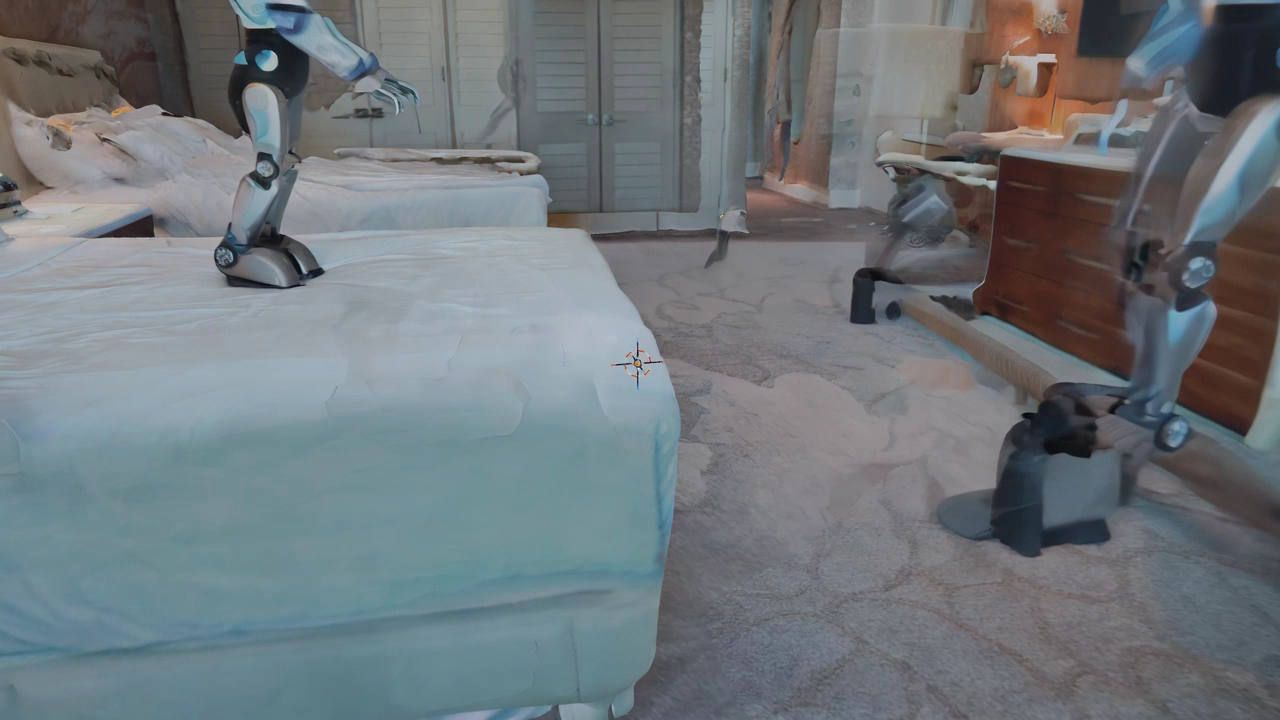
I had iPhone scans from the OpenUSD work, so I rendered a clean frame from a hotel-room scan and asked for a robot walking through it. The first result put one robot standing on the bed and a second one phasing in and out near the dresser.

First Cosmos 3 attempt on my hotel scan: a robot standing on the bed, and a second unstable robot phasing in and out on the right.

Both failures trace back to the input. Image-to-world anchors the subject to the dominant geometry in the frame, and my frame had a bed filling the foreground, so the robot landed on the bed instead of the floor. The phantom on the right came from the scan itself: holes and melty, incomplete walls give the diffusion model unstable structure to latch onto, and it half-renders a second robot, then dissolves it.

This is a data-quality problem wearing a fancy hat. The model was only ever going to be as good as the frame I fed it, and a scan with holes and a bed in the way is bad source data. It’s the same failure mode as pointing a network-automation pipeline at a half-populated source of truth. The tool isn’t wrong. The inputs are, and the output inherits every gap.

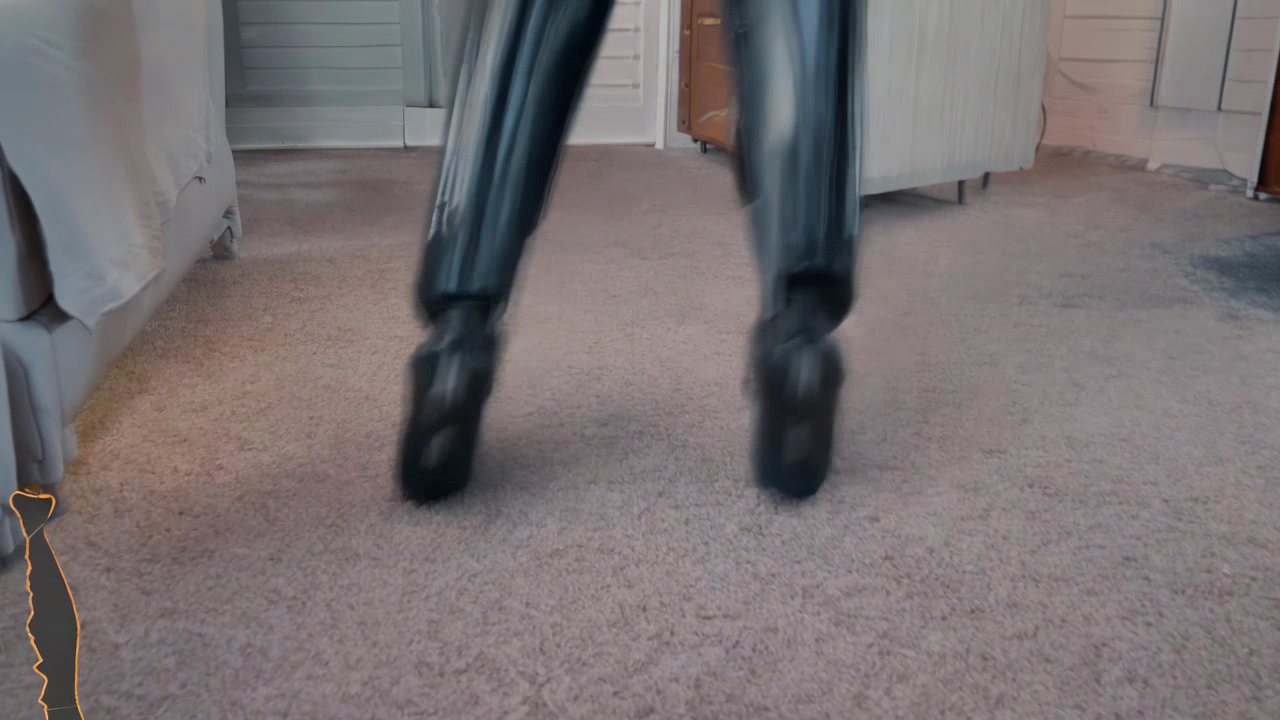
So I tightened the prompt to force a single robot on the floor. The model obeyed, and overcorrected: it framed a low close-up of the robot’s legs and feet on the carpet.

Second attempt: the constraints worked (one robot, on the floor) but the camera zoomed to a close-up of just the legs and feet.

The lesson there is that the model follows the prompt closely. I’d written “on the carpet floor, weight shifting foot to foot,” and it gave me exactly that, framed on the feet. The wording was doing the damage. A third pass with explicit framing language (wide-angle, eye-level, full body head to feet, robot standing at a distance) finally produced a clean full-body robot in the hotel room. The prompt recipe worked. The input was still fighting me.

The cleaner office scan fixed it on the first run

The real insight was that I’d spent three rounds prompt-engineering my way around a bad input. So I scanned a simpler space with a clear patch of open floor: my office. Slow passes, chest height, staying off the window and the monitor since reflective surfaces come back as holes. Then I rendered one eye-level frame with floor in the mid-ground and the room behind it.

drag to look around

The actual iPhone scan of my office, in 3D. Drag to look around. It’s a 2-minute phone capture, holes and warped corners and all. This raw mesh is exactly what I fed the generator below, so everything it gets wrong about the room traces back to what you can see here.

Same prompt recipe, cleaner frame, and it landed on the first run. A single full-body humanoid robot standing on my office floor, the room recognizable behind it.

The contrast with NVIDIA’s studio clip is the whole point of this entry. Their reference used a clean, lit, curated image and produced a backflip. My input was a phone scan with holes and warped furniture, and the same model had to work much harder for a much plainer result. That gap, between a curated asset and a raw real-world capture, is where the real-to-sim problem actually lives. A raw scan is what the real world hands you, and most of the engineering ahead is in closing the distance to something the model finds as easy as a studio image.

Where the AI did the driving

Now the line I flagged at the top. I didn’t hand-debug vLLM or hand-write the curl requests. I drove a coding agent that ran the SSH, the Docker, the API calls, and proposed the prompt changes. I made the calls on direction: which failure to chase, whether a result was good enough, what to try next, when the scan was the problem instead of the prompt. On the OpenUSD work I was the mechanic, building the model in my hands. Here I was the director. Both are real engineering and they’re different kinds, and a learning log is more honest when it says which one a given day was.

The model internals are still where I’m building intuition. I can run a mixture-of-transformers world model and reason about what the reasoner and generator halves are each doing, but the diffusion math underneath is a newer muscle for me, and getting a clip out of it is not the same as understanding it. That’s a gap I’m closing on the study track, not by watching it render.

What stays with me from the afternoon: this ran on a model that was 5 days old, on a GPU I rented by the hour, conditioned on a scan I took with my phone earlier the same day. Putting a robot into a digital twin of a real room used to take a research lab. Today it took an agent, a cloud GPU, and reading the cookbook closely enough to find the flag that wasn’t on the model card. The robot in that office has a long way to go before it’s more than a video, but the loop runs: real space in, plausible motion out.


Reach me on LinkedIn or via Sierra Code Co.