2026-06-06
Putting a robot in my own office with Cosmos 3, 5 days after it shipped
nvidiacosmosphysical-aiworld-modelsvllmlearning-log
Yesterday’s entry was about watching the GTC Taipei keynote and writing down what landed. Cosmos 3, NVIDIA’s open world foundation model for physical AI, was the announcement I most wanted to get my hands on. Today I did. By the end of an afternoon I had it self-hosted on a rented H200, generating video of a humanoid robot walking through a scan of my own office.
Two honest notes before the work. First, this was the AI-assisted half of how I split my learning. The OpenUSD posts on this site were done by hand, slowly, so the mental model would stick. This one was the opposite: I drove a coding agent to handle the SSH, the Docker, and most of the prompt iteration on a cloud GPU, and I steered. I’ll mark where that line falls, because the line matters. Second, the result is rough in places, and the rough parts are the most useful part of the writeup.
What I wanted: a frame in, physics-aware video out
Image-to-world generation is the part of Cosmos that I find genuinely new. You hand the model a single still image and a text prompt, and it generates a short video of plausible motion forward from that frame. It produces actual dynamics, gravity, momentum, a robot shifting its weight, instead of panning a camera over a static picture.
Cosmos 3 ships as two halves. A reasoner that watches a scene and answers in text, and a generator that produces the video. The reasoner is the front of every pipeline, and it’s free to try on build.nvidia.com. I fed it a clip of two robot arms packing a box and asked what happens next. It reasoned through the scene and answered: the right arm places the white object into the box. That’s the understanding half working, with zero setup.
The generator is the half that makes the video, and that’s the half that needs a GPU.
The reasoner is free, generation needs a GPU
NVIDIA’s hosted generator endpoint isn’t live yet, so I self-hosted. A single H200 on Brev, the vllm/vllm-omni:cosmos3 Docker image, an OpenAI-compatible API on port 8000. Roughly $4 an hour.
Standing up the server was the familiar part. A container, a GPU, a port, an API contract. If you’ve ever deployed a service behind an internal endpoint and curled it to check it’s alive, you’ve done this exact shape of work. The model is exotic; the plumbing around it is not. That’s the part of MLOps that a network engineer walks straight into.
Then it broke, and the way it broke is worth a friction note.
Cosmos 3 is open, but its default config pulls a gated dependency that silently kills startup. The model weights downloaded fine under the OpenMDW license. Then the server exited with Cannot access gated repo ... Cosmos-1.0-Guardrail ... you are not in the authorized list. The open model loads a content-safety guardrail that is itself access-restricted, and the failure lands at server startup rather than at request time, so it reads like the whole deployment is broken instead of one optional component. The fix isn’t on the model card. It’s a --deploy-config YAML buried in the cookbook README that disables guardrails server-wide so the gated models never load. Doc-fix: surface the no-guardrails option on the build.nvidia.com deploy tab, ship the promised --cosmos3-no-guardrails flag, and note on the open model card that the default serving path has a gated dependency.
I filed this upstream as NVIDIA/cosmos#196, with the working no-guardrails config and the doc-fix suggestion. That part matters: a friction note only helps the next person if it goes back to the people who maintain the docs.
With guardrails off, the server reached ready in under a minute and started generating. The reference example, NVIDIA’s own studio-lit robot image, produced a flawless 8-second clip of the robot doing a backflip in a living room.
That clip is the model at its best, conditioned on a clean, curated input. Then I gave it mine.
Feeding it my own scan, and watching it go wrong
I had iPhone scans from the OpenUSD work, so I rendered a clean frame from a hotel-room scan and asked for a robot walking through it. The first result put one robot standing on the bed and a second one phasing in and out near the dresser.
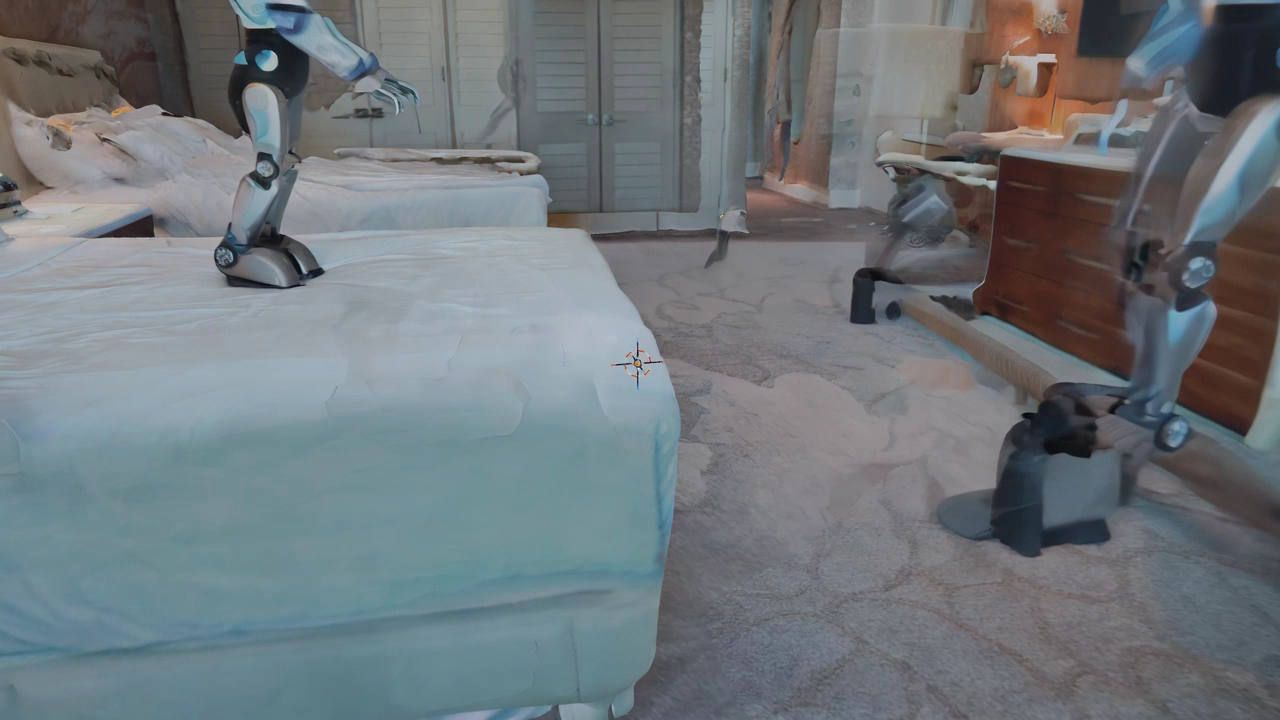
Both failures trace back to the input. Image-to-world anchors the subject to the dominant geometry in the frame, and my frame had a bed filling the foreground, so the robot landed on the bed instead of the floor. The phantom on the right came from the scan itself: holes and melty, incomplete walls give the diffusion model unstable structure to latch onto, and it half-renders a second robot, then dissolves it.
This is a data-quality problem wearing a fancy hat. The model was only ever going to be as good as the frame I fed it, and a scan with holes and a bed in the way is bad source data. It’s the same failure mode as pointing a network-automation pipeline at a half-populated source of truth. The tool isn’t wrong. The inputs are, and the output inherits every gap.
So I tightened the prompt to force a single robot on the floor. The model obeyed, and overcorrected: it framed a low close-up of the robot’s legs and feet on the carpet.
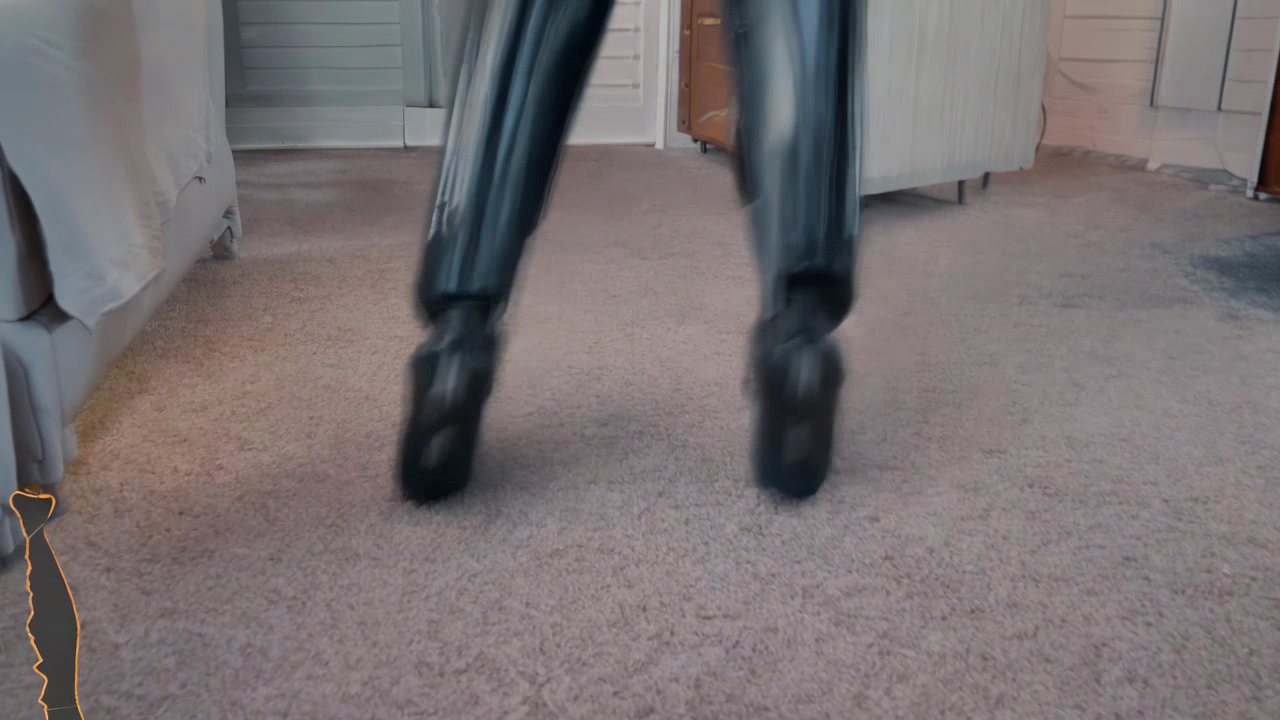
The lesson there is that the model follows the prompt closely. I’d written “on the carpet floor, weight shifting foot to foot,” and it gave me exactly that, framed on the feet. The wording was doing the damage. A third pass with explicit framing language (wide-angle, eye-level, full body head to feet, robot standing at a distance) finally produced a clean full-body robot in the hotel room. The prompt recipe worked. The input was still fighting me.
The cleaner office scan fixed it on the first run
The real insight was that I’d spent three rounds prompt-engineering my way around a bad input. So I scanned a simpler space with a clear patch of open floor: my office. Slow passes, chest height, staying off the window and the monitor since reflective surfaces come back as holes. Then I rendered one eye-level frame with floor in the mid-ground and the room behind it.
The actual iPhone scan of my office, in 3D. Drag to look around. It’s a 2-minute phone capture, holes and warped corners and all. This raw mesh is exactly what I fed the generator below, so everything it gets wrong about the room traces back to what you can see here.
Same prompt recipe, cleaner frame, and it landed on the first run. A single full-body humanoid robot standing on my office floor, the room recognizable behind it.
The contrast with NVIDIA’s studio clip is the whole point of this entry. Their reference used a clean, lit, curated image and produced a backflip. My input was a phone scan with holes and warped furniture, and the same model had to work much harder for a much plainer result. That gap, between a curated asset and a raw real-world capture, is where the real-to-sim problem actually lives. A raw scan is what the real world hands you, and most of the engineering ahead is in closing the distance to something the model finds as easy as a studio image.
Where the AI did the driving
Now the line I flagged at the top. I didn’t hand-debug vLLM or hand-write the curl requests. I drove a coding agent that ran the SSH, the Docker, the API calls, and proposed the prompt changes. I made the calls on direction: which failure to chase, whether a result was good enough, what to try next, when the scan was the problem instead of the prompt. On the OpenUSD work I was the mechanic, building the model in my hands. Here I was the director. Both are real engineering and they’re different kinds, and a learning log is more honest when it says which one a given day was.
The model internals are still where I’m building intuition. I can run a mixture-of-transformers world model and reason about what the reasoner and generator halves are each doing, but the diffusion math underneath is a newer muscle for me, and getting a clip out of it is not the same as understanding it. That’s a gap I’m closing on the study track, not by watching it render.
What stays with me from the afternoon: this ran on a model that was 5 days old, on a GPU I rented by the hour, conditioned on a scan I took with my phone earlier the same day. Putting a robot into a digital twin of a real room used to take a research lab. Today it took an agent, a cloud GPU, and reading the cookbook closely enough to find the flag that wasn’t on the model card. The robot in that office has a long way to go before it’s more than a video, but the loop runs: real space in, plausible motion out.
Reach me on LinkedIn or via Sierra Code Co.